Weighted Random Distribution using Gradients
The Problem
A few weeks ago, I was working on a game in a game jam, and I needed to create a simple weighted random distribution for designing how the NPCs in the game would react to some events. I wanted to have a simple way to visually design the distribution, without having to write complex code or use external tools, since I was in a hurry and just wanted to get things done quickly.
In my use case, the NPCs had only three possible reactions to the events, but a lot of events to react to, so I struggled to find a simpele way to make it customisable in the editor, without having to fall back to spreadsheets or external tools, which would have been a nightmare to maintain and update during the game jam. Also, setting the weights number by number would not work for me because I’m not good at working with numbers, and I wanted to be able to visually design the distribution, so I needed something more intuitive.
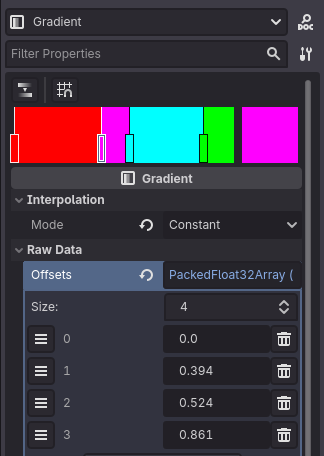
So I came up with a simple solution: using gradients.
The Solution
The idea is actually quite simple: you create a constant-interpolated gradient where each color represents a different outcome, and the range it occupies in the gradient represents its weight in the distribution; then, to get a random outcome, you just sample a color from the gradient using a uniform random value between 0 and 1 and convert the color to a anything that represents the outcome (e.g. an integer, an enum, a string, etc.).
Here’s a quick example of how to implement this in Godot:
# Create a gradient resource with three colors: red, green
# and blue (can be any and how many colors you want, as
# long as they are distinct and consistent with how you
# convert them to outcomes).
# Make sure to set the interpolation mode to "constant"
# and adjust the range of each color to represent the
# desired weights for each outcome.
@export var gradient :Gradient

enum Outcome {
    OUTCOME_1,
    OUTCOME_2,
    OUTCOME_3,
}

func _ready():
    # Example usage: get a random outcome and print it
    var outcome :Outcome = get_random_outcome()
    match outcome:
        Outcome.OUTCOME_1:
            print("Outcome 1")
        Outcome.OUTCOME_2:
            print("Outcome 2")
        Outcome.OUTCOME_3:
            print("Outcome 3")

func get_random_outcome() -> Outcome:
    # Sample a color from the gradient using a random
    # value between 0 and 1:
    var color :Color = gradient.sample(randf())

    # Convert the color to an enum representing the outcome:
    # You can use any method you want to convert the
    # color to an outcome, as long as it's consistent
    # with how you designed the gradient, for example
    # by using a Dictionary that maps colors to outcomes.
    if color == Color.RED:
        return Outcome.OUTCOME_1
    elif color == Color.GREEN:
        return Outcome.OUTCOME_2
    elif color == Color.BLUE:
        return Outcome.OUTCOME_3
This way, you can easily design the weighted random distribution by simply adjusting the gradient in the editor, without having to write complex code or use external tools.
Note: This approach also works in Unity, as Unity also has a Gradient class that you can use in a similar way. The only difference is that the Gradient class in Unity is not an asset, so you can edit it directly in the inspector, but cannot save it as a reusable asset without writing a custom ScriptableObject.
You can see this in action in this simple demo I made. In the top left corner, you can see the gradient that represents the distribution; in the top right corner, you can click the “Spawn” button to spawn a different object that wil be randomly selected based on the distribution.
Pros & Cons
Some pros and cons of this approach:
Pros:
- It’s very intuitive and visual, as you can see the distribution directly in the gradient.
- It’s very easy to adjust the distribution by simply changing the gradient in the editor.
- It doesn’t require any complex math or external tools, as it’s just a simple sampling of a gradient.
Cons:
- The more outcomes you have, the more complex the gradient becomes, and it can be harder to design and maintain.
- Manipulating the range of a specific color in the gradient will affect the range of the other colors, so you need to adjust the gradient carefully to achieve the desired distribution.
- You need to memorise the mapping between colors and outcomes, which can be a bit tricky if you have many outcomes or if the colors are not distinct enough.
That’s all
Overall, I found this approach to be a quick and effective way to create a weighted random distribution in Godot, especially when you want to have visual control over the distribution and don’t want to deal with complex code or external tools.
You can check out the demo project on my GitHub.
Thanks for reading, I hope this has helped in some way.
Comments